PrBar: Stop Alt-Tabbing to GitHub

Jacob Reed · October 15, 2026 · 5 min read
Working with a coding agent has a funny rhythm. The agent writes the code, pushes a branch and opens a pull request in a few seconds. Then everything slows down to human speed. You switch to a browser, wait for CI, find the failing job, scroll through the log, copy the error back into the terminal and tell the agent to fix it. An hour later you go back to GitHub to check for review comments and do the whole thing again.
The agent was never the bottleneck. Getting the state of the PR back into the conversation was. So I built PrBar to fix that.
What is PrBar?
PrBar is a Claude Code mod that shows the current branch's GitHub PR in one line above the prompt: the PR number, the CI state, the review decision, new review comments and any merge conflict. When something needs your attention it's already where you're typing.
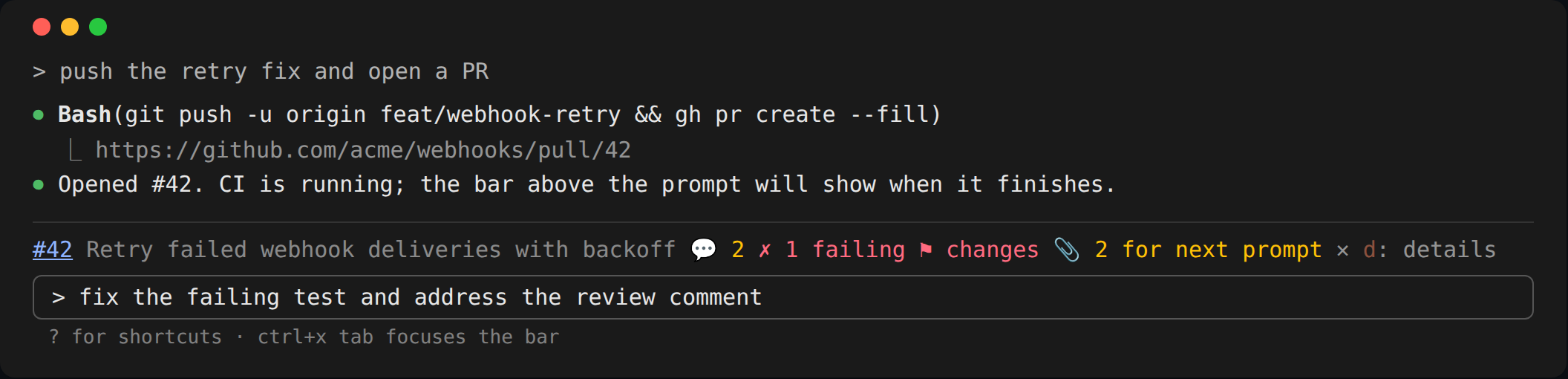
Quiet by default
A status line that shouts at you is a status line you turn off. I've done it to plenty of tools myself. So the bar starts as a single line and only shows what changed since you last looked. If you want more, you opt in: a second row with the failing check names, passing checks, conversation comments, resolved threads. Every one of those is a setting and every one defaults to off.
The same rule applies to alerts. You get a toast when CI turns red, never on the first poll. Opening a session on a branch that's already broken shouldn't greet you with noise.
When you do want the details, /pr (or d on the bar) opens a pane beside the transcript on whatever needs you first: the first unread comment, otherwise the first failing check. Pick a check and you get the tail of its log. Pick a comment and you get the lines of the diff it points at, numbered the same way GitHub numbers them. If you work with stacked PRs, the pane lists the whole stack and lets you check out another branch in it (it refuses if you have uncommitted changes to tracked files).
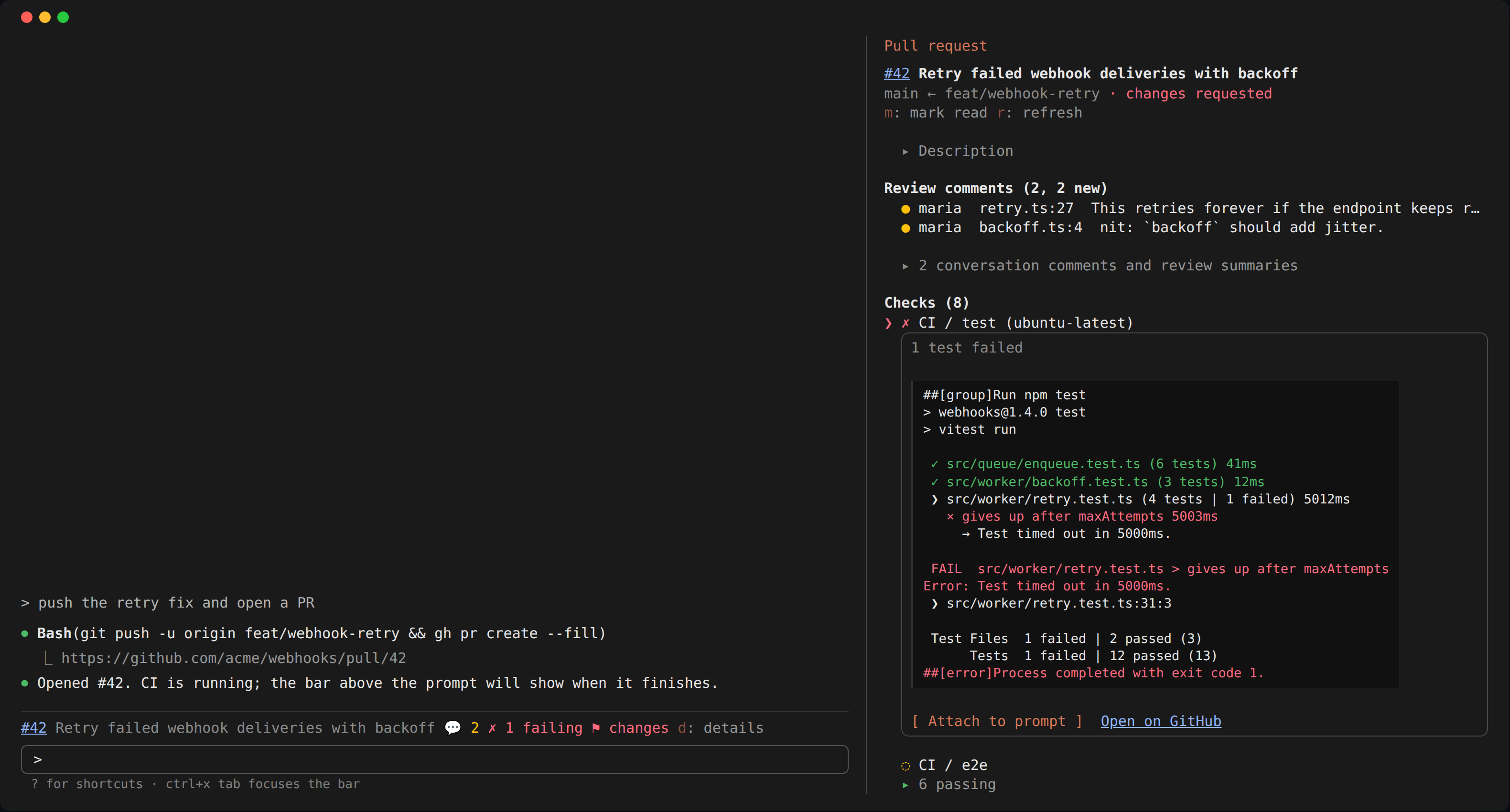
Hand the agent context, don't type for it
Seeing the failure isn't the useful part. Fixing it is. Every failing check and comment has an Attach to prompt button that queues it, along with its log tail or code, for the next prompt you send. You type "fix this" and the agent gets the evidence once, as context. No more copying stack traces out of a browser tab.
The one rule I held myself to, the same one from AgentBar, is that the tool never acts for you. Nothing gets typed or sent on your behalf. Letter keys only work while the bar or pane has focus, so nothing you write in the prompt ever presses a button by accident. Attachments are capped at 40,000 characters, and prompts that show up on their own (a background task, another session) leave your attachments alone for the prompt you actually write.
Being a good GitHub citizen
Polling an API from every terminal you have open adds up fast, so PrBar tries to be polite about it:
- One request per poll. A single GraphQL query gets the PR, the checks, the reviews and the stack.
- Poll based on what's happening. Every 20 seconds while a check is running, every 90 once CI settles.
- Back off when things go wrong. Five minutes after a network error, and on a rate limit it waits until GitHub says the limit lifts.
- Refresh when it matters. A
git push, a branch switch or agh prcommand from the agent triggers a refresh right away, so the fast path doesn't depend on the timer.
Trust is part of the product
I'm asking you to install something that holds a GitHub token and reads your conversation. That should make you a little nervous! So the README lists everything PrBar touches: the two environment variables it reads, every program it runs (with fixed arguments, never through a shell), every host it talks to and what it stores. All external calls are declared in one place, so claude plugin validate prints the same list. There's no telemetry.
The hooks are held at 100% statement, branch, function and line coverage with nothing excluded, and the tests run the bar and pane against both the terminal and the desktop app.
Try it out
Install it from the marketplace in Claude Code:
/plugin marketplace add jreed91/pr-bar
/plugin install pr-bar@jreed91
Then open a session on a branch with a PR and push something. If CI goes red, you'll know before you think to check. The code is on GitHub and there's more detail on the project page. If something's broken or noisy, open an issue and let me know.
Keep reading
AI is an Accelerator, Not a Solution
December 31, 2025 • 2 min read
Why implementing AI won't magically fix your existing problems - and how to use it as the powerful accelerator it actually is.
Getting Started with GitHub Copilot Instructions in JetBrains IDEs
June 08, 2025 • 2 min read
Learn how to configure Copilot instruction files in IntelliJ and WebStorm for better code suggestions and automatic semantic commits.
Making Sense of Postgres Query Plans
September 01, 2025 • 9 min read
An overview of Postgres Query Plans and how to use them